Handwritten decorative font for personal Windows projects
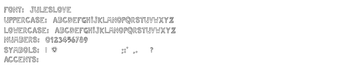
Jules Love by Jules Love is a decorative handwritten font designed to lend a personal, romantic feel to digital projects. It installs as a standard TrueType/OpenType font on Windows and supplies an informal script with complete uppercase and lowercase sets, basic punctuation, and common symbols for use in documents, scrapbooks, and greeting cards. Intended for hobbyists, students, and graphic designers, the font adds a hand-drawn tone suited to non-commercial creative projects.
The font applies a handwritten voice to on-screen and printed text
The font presents an informal script that mimics natural penmanship, described as playful and charming. It targets visual elements where a personal or romantic mood matters rather than neutral body text. Typical uses listed by the designer include personal correspondence, digital scrapbooking, and greeting cards, and the file is supplied in standard formats so it integrates directly with desktop publishing workflows.
How much control the font gives over letterforms and punctuation
The supplied character set contains a full set of uppercase and lowercase alphanumeric characters plus basic punctuation and common symbols, which lets users control letter case and standard symbols in layouts. The designer states the font is optimized for legibility while keeping a decorative style. Support for extended accented glyphs is noted as limited in some versions, so language coverage needs verification before multilingual use.
The font does not run as a background process and integrates with apps
Installation places the file into the system font collection, after which the font appears in application font menus. There is no bundled background service; the typeface is available to editors and layout programs once installed. This means the visual change is applied at the document or layout level rather than via a persistent desktop utility, keeping desktop resource impact minimal.
Installation and day-to-day use are straightforward for typical desktop users
Windows installation follows a simple extract-and-install workflow: extract the .ttf or .otf from a downloaded archive, right-click the file, and select Install. Once installed the font appears in Microsoft Word and other editors, making it usable for headlines, short passages, and print-ready assets. Creative users can apply the face to cards and headings without additional tooling or complex configuration.
Practical choice for informal creative projects with a usage caveat
The font suits casual creators and hobby designers who need a handwritten headline or decorative accent in digital or printed pieces; it performs that role without adding desktop overhead. A practical tip is to test the type at the intended print or screen size and pair it with a neutral companion face for body copy. For projects requiring broad language support or commercial licensing, verify glyph coverage and license terms first.
Pros
Authentic handwritten script that mimics natural penmanship
Complete uppercase and lowercase alphanumeric character set
Available in standard TrueType/OpenType formats for easy installation
Optimized for legibility while retaining a decorative style
Cons
Support for extended Latin accents and special glyphs may be limited
Designed primarily for informal, non-commercial creative projects
Not intended as a replacement for full multilingual or corporate type families
Laws concerning the use of this software vary from country to country. We do not encourage or condone the use of this program if it is in violation of these laws. Softonic may receive a referral fee if you click or buy any of the products featured here.